
Opencart Import/Export of Goods and Feed
I can set up a feed for any service
 OpenCart 2 / 2.3 / 3 · improvements and support
I fix bugs, refine functionality, configure modules, product import, filters, payment, delivery, and other tasks for online stores.
 Modules and templates
Feed`s and imports
Catalog and Cart
Modules and templates
Feed`s and imports
Catalog and Cart
I usually reply within 10–20 minutes
Web development · Website Updates on OpenCart
Store owners often encounter minor but critical issues: imports aren't working, the layout is off, a module conflicts with the template, shipping is calculated incorrectly, products aren't updating, or the site is slow. These issues can be resolved without a complete website overhaul.
What can be fixed
Errors in the site's operation
Products, categories, attributes
Filters, SEO, optimization
Modification of modules
Import and export
Template edits
Quick contact
Or write in a convenient messenger and send a link to the site or a screenshot of the problem.


My specialization
Popular services frequently needed by OpenCart online store owners
I can set up a feed for any service

Speeding Up OpenCart Without Losing Functionality

I’m automating notifications via Telegram.

Turnkey online shops of any complexity on OpenCart

Quick transfer of your site to another month

Store integration with any API and CRM systems

I find and fix bugs and errors on the website

Audit and consultation for opencart sites
Without chaos and unnecessary technical words
At the first stage, it is enough to briefly describe the problem. After that, I analyze the task and explain what can be done.
Send a link to the site, a screenshot, or a short description of the problem.
I check where the problem occurs and what files, modules, or settings may be involved.
I explain what needs to be done, what options are available, and how long it may take.
I make the changes, test the result, and show the finished solution.
Why you can contact me
I work not only with the visual part, but also with the site logic, modules, imports, catalog structure, and technical issues.

Templates, controllers, models, caches, crowns.

If a problem can be solved with a small edit, there is no need to redesign the entire website.

What happened, what will be done and what will be the final result.

Opencart, design, SEO/SMM, Telegram integrations and analytics.
Work examples
Most interesting projects cannot be published publicly, but if you need more examples, write to me
Profiles and reviews
In my free time, I manage several social networks and often post useful information on development and business topics.
Cross-linking
If you need not only the current service, but also a website, advertising, or improved client communication.

WordPress technical support

Business without unnecessary red tape.

I’m fine-tuning the shop to suit your needs.

I develop modern, turnkey websites.
Need help?
You can simply send a website link, a screenshot, or a brief description of the problem. For a faster response, please contact us via Telegram.
 Email: [email protected]
Answers to questions
It means changing how the store works so it fits your business, not the other way around. Custom fields, a different checkout flow, new filters — whatever you actually need, not what the default theme gives you.
Both, depending on the task. If a ready module gets close enough, I tweak it. If not, that's OpenCart custom coding: I write the piece you need from scratch.
Anything beyond a settings change: a new checkout step, a custom shipping rule, an integration that doesn't exist as a plugin. OpenCart custom development is for things the store can't do out of the box.
Yes, that's the point. OpenCart custom features get built and tested on a copy first, so your store keeps taking orders while the work is happening.
It's a piece of functionality built for your store specifically — not a generic plugin from the marketplace. You'd need one when nothing off-the-shelf does exactly what your business needs.
Both. Most of the time editing the current theme is faster and cheaper. A full OpenCart custom theme makes sense if you're rebranding or the current design is holding the store back.
Bug fixes, module and theme edits, catalog and checkout changes, integrations, speed and SEO tweaks. OpenCart customization services usually start with a look at what's actually broken or missing.
Pretty much — different word, same idea. OpenCart modification just means changing how the store behaves or looks, whether that's one small fix or a bigger set of changes.
Send a link to your store and describe what's not working or what you want added. I'll look at it and tell you what's realistic, how long it'll take, and what it costs — before any work starts.
Most OpenCart stores run fine for a while, and then something starts to bug you — usually something small, please note, not something that needs a whole new site. An extension you installed conflicts with the theme, or two extensions conflict with each other. Shipping calculates wrong on certain orders. Product data doesn’t sync the way it should, or an extension you use stops working after an update. None of that means you need a new site — it usually means the current one needs a fix in the right place.
That’s what it means to customize OpenCart: a focused change, not a rebuild. I look at what’s actually broken, fix it, and check it works before calling it done. Your store keeps taking orders the whole time, because taking the whole system offline to fix one bug defeats the point.
OpenCart is a popular open source platform for a reason — it’s flexible enough to build almost any kind of ecommerce store on it, and there’s a large community behind it. But that flexibility also means every store ends up a little different: different modules, a tweaked theme, custom fields nobody documented, sometimes an old extension nobody remembers installing. So I never guess, and I don’t touch code I don’t fully understand yet. I open the admin panel, look at the code, and figure out what’s actually there before I touch anything — whether that means opencart custom coding or just adjusting a setting nobody had found yet.
Here’s what usually brings people to me: a page that used to load fast now takes forever, an import that silently fails, checkout that throws an error for some customers but not others, or a feature the store just doesn’t have and the admin panel’s settings can’t add. If any of that sounds familiar, it’s worth fixing sooner rather than later — a broken checkout doesn’t just annoy users, it loses you orders, every single day it stays broken.
Store owners come to me for a wide mix of tasks, and no two requests are ever quite the same. Here’s the short version of what usually falls under this service:
That’s basically opencart customization services in one list, but if your task doesn’t fit any category on it, just describe it to me directly. Some of the more common requests don’t fit neatly into any single category — an admin login that stopped working, a payment gateway that needs reconfiguring, one platform that needs to talk to a cloud-based system, software your team already uses for order management. I take those too, and I’ll tell you upfront if it’s outside what makes sense for OpenCart.
A store rarely runs on its own — it talks to a CRM, a payment provider, several shipping methods, sometimes a cloud-based marketplace tool. I set these connections up so orders and customer data move automatically for every user and every order, instead of your team copying them by hand from one system to another. Less manual work usually means fewer mistakes in the data.
Feeds and imports are their own thing, and this is where most of the manual, repetitive work usually hides. I build XML or CSV feeds for ad platforms and marketplaces, create a working import for your supplier’s file type, and set up prices and stock to update from it automatically, without anyone touching a spreadsheet by hand. Once it’s running, the catalog stays current on its own — no more copy-pasting prices from a supplier’s spreadsheet.
A slow page costs you two things at once: rankings and sales — and it’s usually one of the first things worth fixing, well before you spend more on marketing. People leave before a slow page even finishes loading, and Google’s search engine notices too. So speed optimization is usually part of the job — cutting load time, cleaning up the code that’s dragging things down, fixing broken URLs and filters that confuse both users and search engines, and making sure the theme is fully compatible with newer PHP versions. Small changes here often add up to more than any single big feature would.
If traffic is fine but orders aren’t, the problem is usually somewhere between the homepage and checkout — sometimes it’s the content, sometimes it’s just one confusing step. I look at where people actually drop off — a confusing product page, a checkout step that asks for too much — and fix what’s costing you the most orders first. It’s advanced work in the sense that it takes testing, not guessing, and I’ll walk you through what I find along the way.
A brand-new marketing landing page is a different job entirely — a handful of pages and a contact form, done, built once and rarely touched again. A store is not that. There’s a catalog, user accounts, a cart, payments, inventory, and data flowing between all of it, often built on multiple systems at once. Updating one takes actually understanding how OpenCart is put together underneath: templates, controllers, the database, caching, cron jobs — the kind of thing you can’t fake with a quick installation from a marketplace.
Most of the time, opencart modification is enough — you keep what works and fix what doesn’t. A full rebuild only makes sense when the code underneath is so outdated, or so heavily modified by a past developer, that patching it costs more than starting fresh. I’ll tell you honestly which one your site needs, based on what I find when I open the codebase — there’s no reason to sell you a rebuild if a few fixes will do.
This whole service is sometimes called opencart custom development, and other times just “fix my store” — same work, different name.
There’s no single price for “fix my OpenCart site,” because a small template edit and a full integration are simply not the same job. I give you a number after looking at the actual task, not before, and I’ll walk you through how I got there if you want the details. What it costs depends on scope: how many modules or pages are involved, how much testing it needs, and whether I have access to a staging copy or need to set one up first. No surprise charges once we’ve agreed on the work — the price I quote is the price you pay, full stop.
Once something’s fixed, it’s worth keeping an eye on it going forward, since one small change can affect several modules at once. Updates to the OpenCart core, an extension, or any third-party module can quietly break things that worked yesterday — that’s normal for this kind of platform, not a sign anything was done wrong. Having someone who can catch it fast, before customers even notice, is the difference between a five-minute fix and a week of lost orders. I offer both one-off fixes and ongoing, dedicated support, whichever fits how your store actually runs, whether you need help every week or just want someone on call. Either way, opencart customization stays about the store, not about selling you extra hours.
If you’re looking for opencart custom features and not a generic plugin list, you get one person who understands the whole stack — not a queue of tickets split between a designer, a developer, and someone else who “used to know OpenCart.” I explain what’s happening in plain language, do the fix, test it, and show you the result, using the same tools and coding standard I’d trust on my own store. No jargon, no upsell, no padding the invoice with extra features you never asked for.
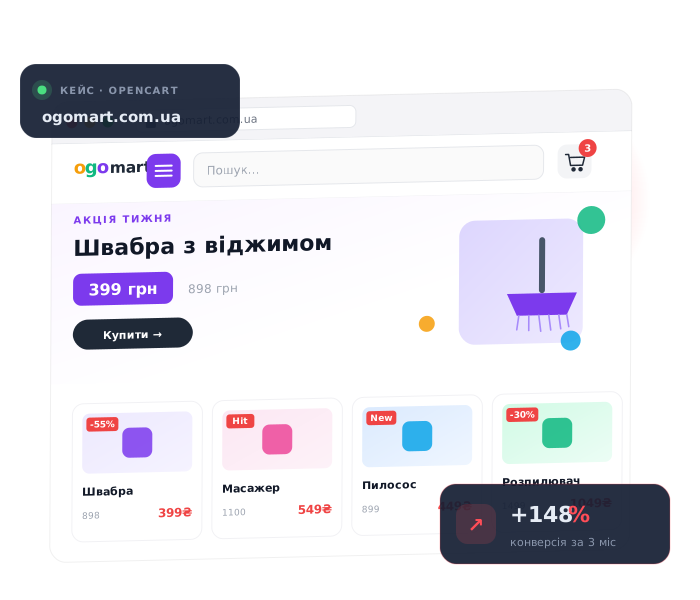
Real, professional examples of past work, built for real online stores, are in the case studies section — imports that used to fail, checkouts that used to break, an online store that used to load slowly and now doesn’t. It’s not a full showcase of every project, just the ones I’m allowed to share. If you’ve got a task — big or small, one bug or a full set of changes — the fastest way to find out what it takes is to just describe it.
Send a link to your site, a screenshot, or just describe what’s wrong, right here on this page, using whatever language you’re comfortable with — over WhatsApp, Telegram, or the contact form below. I’ll tell you what’s realistic, how long it’ll take, and what it costs, before any work starts — no strings attached.